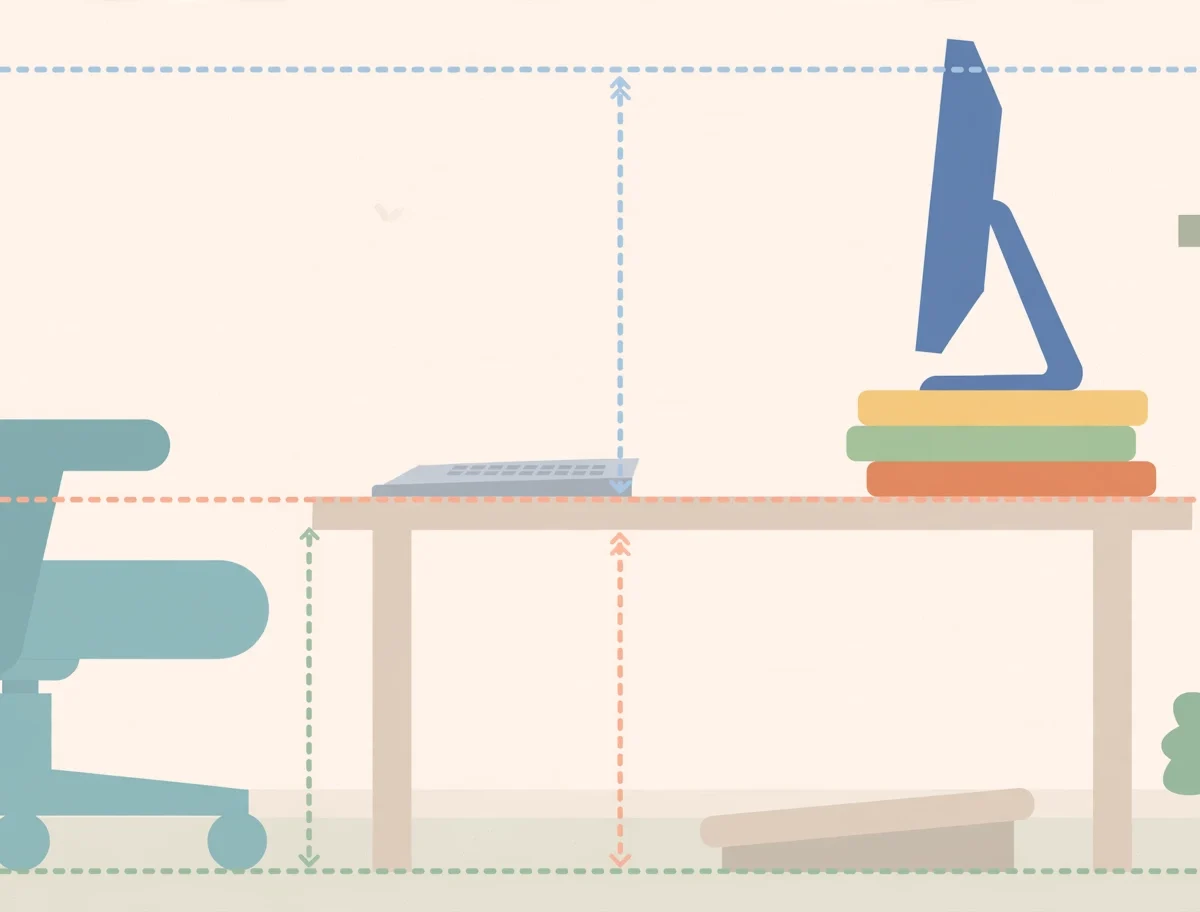
If you sit at a desk for most of the day, your posture is quietly shaping how you feel. The quick answer to how to improve posture while working at a desk is this: set your chair so your feet are flat and thighs parallel to the floor, raise your monitor so the top of the screen sits at or slightly below eye level about an arm’s length away, keep your elbows near 90 degrees, support your lower back, and change position or take a microbreak every 30 to 60 minutes. These adjustments relieve the neck, shoulder, and back strain that most desk workers accept as normal.
Physical therapists often say the best posture is your next posture, meaning movement matters more than any single “perfect” position. This guide covers the full ergonomic setup, simple daily exercises, and habits that protect your spine without expensive equipment.
Note: This article is for general informational purposes and is not medical advice. If you have persistent pain, numbness, or a spinal condition, see a healthcare professional before starting new exercises.
Quick Summary: Desk Posture Fixes at a Glance
| Fix | Priority | The Rule |
|---|---|---|
| Monitor height and distance | High | Top of screen at or just below eye level, about 20-26 inches (an arm’s length) away |
| Chair setup | High | Feet flat on floor, thighs parallel to floor, lower back supported |
| Keyboard and mouse position | High | Elbows near 90 degrees, wrists neutral, devices close to the body |
| Microbreaks | High | Stand, stretch, or walk 1-2 minutes every 30 minutes (OSHA guidance) |
| Eye breaks | Medium | 20-20-20 rule: every 20 minutes, look 20 feet away for 20 seconds |
| Position changes | Medium | Alternate sitting and standing; never stay frozen in one posture all day |
| Strengthening exercises | Medium | Wall slides, shoulder blade squeezes, and neck mobility work 2-3 times daily |

Warning Signs Your Desk Posture Needs Help
Poor posture rarely announces itself loudly. It creeps in through symptoms that are easy to blame on stress or tiredness:
- Neck and shoulder tension that builds through the afternoon
- Lower back pain or stiffness when you stand up
- Headaches or eye strain by the end of the workday
- Tingling or numbness in the arms or hands
- General fatigue and difficulty concentrating
If several of these sound familiar, your setup is likely the culprit. Good ergonomics can ease stress on the body and help you stay comfortable, as the Mayo Clinic’s office ergonomics guide emphasizes.
The Chair: Your Foundation
Start from the ground up, because everything above depends on how you sit.
- Seat height: Adjust so your feet rest flat on the floor and your thighs are parallel to the floor. If your chair cannot go low enough, use a footrest or a sturdy stack of books.
- Seat depth: Leave 2 to 3 inches between the back of your knees and the seat edge so circulation is not cut off.
- Back support: Choose a chair that supports the natural curve of your lower back. If yours does not, roll up a towel or add a small lumbar pillow.
- Armrests: Position them so your arms rest gently with elbows close to your body and shoulders relaxed, never hunched.
No ergonomic chair? Even free fixes work: a folded towel behind your lower back and books under a laptop change the geometry meaningfully. Comfort and alignment matter more than price tags.
The Desk: Elbow Height Is the Rule
Your desk height decides whether your shoulders can relax. The golden rule: with your shoulders relaxed, your elbows should bend at roughly 90 degrees when your hands are on the keyboard. A desk that is too high forces your shoulders up; one that is too low makes you slouch forward.
Keep the space under the desk clear. Storing boxes or a bag under the desk shrinks legroom and pushes you into awkward positions. If the desk cannot be adjusted, raise it with sturdy blocks or raise your chair and add a footrest to compensate.
Monitor Position: The Biggest Neck Saver
A low monitor is the leading cause of “tech neck,” the forward-head posture that strains the neck and upper back. Fix it with three rules:
- Height: The top of the screen should be at or slightly below eye level. If you wear bifocals, lower it another 1 to 2 inches.
- Distance: Sit about an arm’s length away, roughly 20 to 26 inches from the screen.
- Alignment: The screen should be directly in front of you, not angled to one side, and positioned perpendicular to windows to reduce glare.
Laptop users have a built-in problem: the screen and keyboard are attached, so one is always at the wrong height. The practical fix is a laptop stand plus an external keyboard and mouse, which lets you raise the screen to eye level while keeping your hands at elbow height. A stack of books works as a free stand.
For dual monitors, put the screen you use most directly in front of you and the secondary one angled no more than 35 degrees to the side. If you use both equally, place them side by side with their edges touching, angled slightly toward you.
Keyboard and Mouse: Small Details, Big Difference
Many people sabotage good posture at the keyboard. Keep your wrists in a neutral position, not bent up, down, or sideways, and keep both devices close so your elbows stay near your sides instead of reaching.
- Keep the keyboard at elbow height with a relaxed, straight wrist line.
- Position the mouse right next to the keyboard to avoid overreaching.
- Use a wrist rest for support between typing, but do not press your wrists into it while typing.
- If you type all day, an ergonomic curved keyboard or a vertical mouse can reduce forearm strain.
Move: Microbreaks Beat Perfect Posture
Here is the secret most posture guides bury: sitting is not the enemy, staying still is. The Occupational Safety and Health Administration encourages office workers to take microbreaks of 1 to 2 minutes every 30 minutes. Stand up, roll your shoulders, walk to get water, or simply shift position. Movement improves circulation, reduces muscle stiffness, and prevents spinal compression.
A sit-stand desk can help, but the honest truth is that standing all day causes its own problems. The win is variety: alternate between sitting and standing, and pair any desk with regular movement and stretching. If you stand, an anti-fatigue mat is worth the small investment.
Regular movement is also the theme of the benefits of walking 10,000 steps a day, and short walks are one of the easiest microbreaks you can build into a desk job.
Daily Exercises That Reverse Desk Damage
Desk work shortens the chest muscles and weakens the upper back. These simple exercises rebalance that pattern. Do them 2 to 3 times daily, holding each stretch 15 to 30 seconds and breathing deeply.
Wall Slides
Stand with your back against a wall, hands and elbows touching the wall. Slide your arms upward, then lower them while keeping contact. Repeat 10 to 15 times. This stretches the chest while strengthening the upper back.
Shoulder Blade Squeeze
Sit or stand tall and squeeze your shoulder blades together as if holding a pencil between them. Hold 5 seconds, release, and repeat 10 times. This directly counteracts the rounded-shoulder slump.
Neck Rolls and Chin Tucks
Slowly roll your neck in gentle circles, then practice chin tucks: pull your chin straight back to align your ears over your shoulders. Both relieve the forward-head strain that monitor work creates.
Seated Spinal Twist
Sit tall, place one hand on the opposite knee, and gently rotate your torso. Hold 20 seconds per side. This relieves lower-back tension from long sitting sessions.
Pairing these with relaxation practices helps too: daily deep breathing exercises reduce the muscle tension that stress adds to poor posture.
Lighting, Glare, and Eye Strain
Posture and vision are linked. When you squint at a glaring screen, your head creeps forward. Reduce glare by positioning the monitor perpendicular to windows, using adjustable blinds, or adding an anti-glare filter. Follow the 20-20-20 rule: every 20 minutes, look at something 20 feet away for at least 20 seconds. And keep the topic of rest in view: good daytime ergonomics and solid sleep hygiene together determine how recovered your muscles feel each morning.
Setting Up a Good Home Office on a Budget
You do not need a designer office to protect your posture. The hierarchy of spending is simple: fix the free things first, then buy only what the free fixes cannot solve. Start by raising your monitor with books, rolling a towel behind your lower back, and setting phone reminders for microbreaks. Those three changes cost nothing and deliver most of the benefit.
If you buy one thing, make it an external keyboard and mouse for laptop work, since that single purchase unlocks proper monitor height. Next in line is a decent adjustable chair or a quality lumbar cushion, followed by a monitor arm or stand. A sit-stand desk is a luxury, not a necessity: alternating between your desk and a kitchen counter for standing periods achieves similar variety for free.

Frequently Asked Questions
What is the correct sitting posture at a desk?
Sit with feet flat on the floor, thighs parallel to the floor, lower back supported, shoulders relaxed, elbows near 90 degrees, and the top of the monitor at or just below eye level. Then change position regularly rather than holding any posture rigidly.
Are standing desks better than sitting desks?
Neither is better on its own. Research finds sit-stand desks reduce back pain only when paired with regular movement and stretching. The real benefit is alternating positions throughout the day.
How often should I take breaks from sitting?
Take a 1 to 2 minute microbreak every 30 minutes, per OSHA guidance, and shift position every 30 to 45 minutes at minimum. Even standing and stretching briefly counts.
Can poor posture really cause headaches?
Yes. Forward-head posture strains the neck and upper-back muscles, and that tension commonly refers pain upward as tension headaches. Raising the monitor to eye level and doing chin tucks often helps.
Do I need an expensive ergonomic chair?
Not necessarily. A basic adjustable chair plus a rolled towel for lumbar support covers the essentials. Spend money only after the free fixes, like monitor height and break habits, are in place.
What is the 20-20-20 rule?
Every 20 minutes, look at something at least 20 feet away for at least 20 seconds. It relaxes the eye muscles and gives your neck a reason to reset its position.
Verdict: Fix the Setup, Then Keep Moving
Improving posture while working at a desk comes down to two things: a setup that supports neutral alignment, and the habit of moving before stiffness sets in. Set your monitor at eye level, support your lower back, keep your elbows at 90 degrees, and take microbreaks every half hour. Add the wall slides and shoulder squeezes a few times a day. Most desk workers feel a difference within a week, and the long-term payoff is a healthier spine, fewer headaches, and steadier energy through the workday.
For more practical health and productivity guides, keep reading DigitalGeekSpot.